How Do Thermal Goggles Work?
If you’ve ever wondered how thermal goggles let you see in the dark and through smoke, you’re not alone. These devices work by detecting heat rather than light, revealing heat sources that are invisible to the naked eye.
By the end, you’ll understand how they transform heat signatures into images that show you hidden people, animals, and machinery in real time. Keep reading to discover the ins and outs of how thermal goggles make the invisible visible.
How Do Thermal Goggles Capture Heat Signatures?
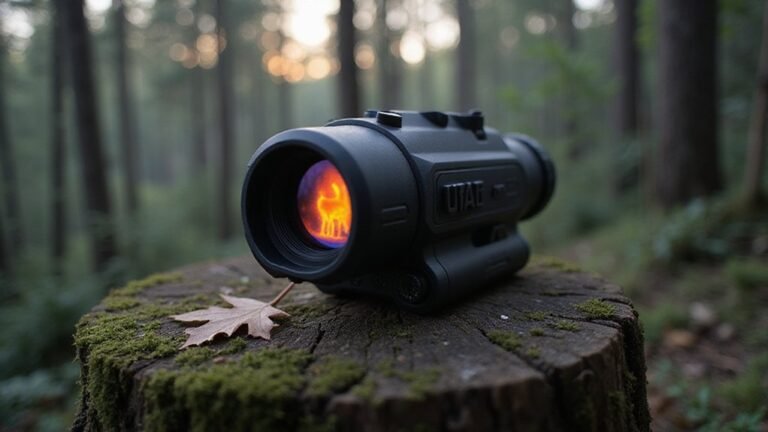
Thermal goggles detect heat signatures by sensing infrared radiation emitted by objects. Every object above absolute zero emits some level of infrared energy, which is invisible to the naked eye. These goggles use a specialized lens to focus this infrared energy onto a sensor array, such as a microbolometer, which measures tiny temperature differences ranging from about 0.01°C. Warmer areas generate stronger electrical signals, whereas cooler regions produce weaker signals. Because you’re reading the heat map rather than visible light, thermal goggles can reveal the presence of a person behind foliage or in darkness, where traditional optics fail. The sensor converts these signals into digital data that creates a visual heat image, highlighting temperature variations and allowing you to distinguish between objects based on their heat emission. This process relies on the fact that all objects produce infrared emission from vibrating molecules, which is a core principle of how heat energy generates radiation. Understanding this principle helps buyers evaluate how thermal imagers work when comparing different models for purchase. Just as with a cellular trail camera, the performance of thermal goggles is often linked to subscription costs for data transmission and cloud storage. For instance, night vision relies on amplifying ambient light rather than detecting heat, which is a key distinction when choosing between these two technologies.
What Happens Inside the Processor to Make a Picture?
Once the detector array captures raw thermal data, the processor converts this information into a visible picture through several key steps. First, it performs sensor calibration to correct for differences in sensitivity among individual detectors, ensuring each pixel produces consistent results. Next, it boosts weak electrical signals via signal amplification, which is crucial for preserving temperature variations across the image.
The processor then transforms the amplified analog signals into digital data, applies filters to remove noise, and adjusts contrast for better clarity. It combines all this processed information into a single full-frame heat map, translating temperature differences into a clear visual pattern. Finally, it sends this thermal image to your display, allowing you to interpret the heat data visually. This entire pipeline must be optimized for low power consumption to keep the drone aloft long enough for meaningful thermal surveys.
Why Do Thermal Displays Use Bright Colors?
Thermal displays use bright colors because they serve as a visual coding system that makes heat differences easily detectable. Since raw temperature data from thermal cameras isn’t directly visible to the human eye, bright colors are assigned to each pixel to represent various temperature levels—a process called false color mapping. This technique leverages your natural ability to perceive color contrasts more quickly than subtle grayscale variations. Warmer areas are typically shown in bright reds, oranges, and yellows, while cooler regions appear in blues and purples. This mapping relies on infrared sensors that detect heat radiation, similar to the core technology in game cameras. These vivid colors do not correspond to specific temperatures but shift dynamically based on the scene’s temperature range. The use of bright, distinct colors enhances rapid recognition of heat patterns, hot spots, and anomalies without requiring you to interpret numerical values. The color palette transforms complex infrared data into an intuitive graphic pattern, allowing you to scan and understand heat distribution at a glance.
What Heat Signatures Can Thermal Goggles Reveal?
Thermal goggles can reveal a wide range of heat signatures based on temperature differences in the environment. They highlight warm-blooded mammals such as humans and deer, making them visible against cooler surroundings. This is especially useful for detecting hidden or obscured animals in dense brush or total darkness, since their body heat creates a distinct glow. Vehicles are also easily visible due to their hot engines and tires, which retain heat even after shutdown. Recent footsteps or occupied seats leave residual warmth on the ground, showing up as temporary traces. Environmental features like hot pipes, insulation gaps, and electrical hotspots stand out because different materials soak up or release heat at varying rates across the infrared spectrum. Since thermal goggles detect temperature rather than visible light, heat absorbed or retained by soil, metal, or water creates sharp contrast—making it impossible to miss subtle heat signatures in the environment. For drivers, integrating this technology with automotive thermal cameras can enhance night vision and obstacle detection on the road. Moving heat sources are easier to track, as targets remain visible when they change position due to continuous scanning updating the thermal distribution in real time. This ability to detect temperature variations relies on infrared radiation emitted by all objects, providing a clear advantage in complete darkness or through smoke and fog. For those deciding between technologies, an infrared vs thermal camera comparison can help clarify which option best suits specific needs and budgets.

[Long /Short Range]: Dsoon UHD Night vision goggles 8x digital zoom and a Wide Field of View (FOV) of 10° are critical for far/close-quarters use. 850nm IR LEDs are designed to illuminate everything nearby. The display design of the binoculars allows you to experience the 3D real-time observation effect in an immersive, recording of audio and video.

UNMATCHED CLARITY: With a high IR resolution of 256x192 and a smooth 50Hz refresh rate, the thermal monocular provides vivid thermal images, capturing every detail of your surroundings with precision.

Enhanced Visual Clarity: 1.54" HD high definition large screen with wider viewing range, equipped with 7x high magnification telescope and 20mm adjustable focus high transmittance photosensitive lens, making it easier to search and find farther targets
When Does Thermal Imaging Struggle or Excel?
Thermal imaging struggles most in wet, humid conditions, especially when humidity exceeds 80 percent. High humidity causes infrared signals to scatter and absorb more atmospheric moisture, which sharply reduces your effective detection range—sometimes to just 30 to 50 percent of normal performance. Precipitation like rain and snow further degrades imaging: water droplets absorb infrared radiation, making targets harder to spot. Snow can also create false reflections or clutter, complicating image interpretation.
Fog, haze, or smoke present significant obstacles as well. These particles scatter infrared waves, drastically diminishing contrast and range. When weather contains moisture or particles building in the air, your thermals become less reliable. Hot backgrounds, such as asphalt or engine torches, also impair detection when ambient temperatures rise near or above the target’s heat signature. As a result, you get optimal performance in dry, cold conditions but will struggle to maintain clarity and range once moisture, particles, or thermal clutter fill the air. Importantly, thermal cameras cannot see through walls because solid materials block infrared radiation entirely from the far side of the wall. A protective housing can help mitigate some environmental interference, but it will not overcome fundamental atmospheric limits.

Super Resolution Enhancement: The Flagfront YXI96 thermal camera is equipped with 240x240 super-resolution imaging technology, providing clearer images and capturing more details; A high frame refresh rate of 25Hz ensures a smooth inspection experience
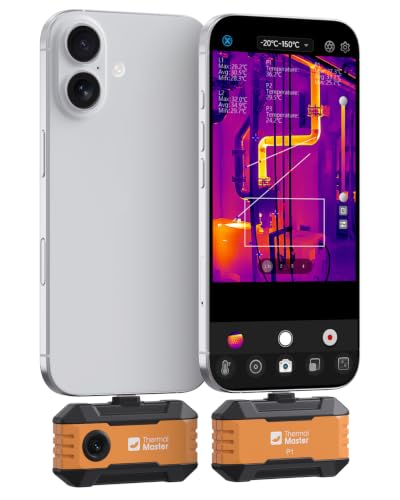
USB-C Phone Compatibility: Plug the P1 thermal camera into USB-C iPhone, Android, tablets, or Windows devices and use the Thermal Master app for quick field checks; Lightning iPhones require a Type-C to Lightning adapter sold separately.

【Ultra-Sharp Thermal Imaging】 Capture clear, detailed heat signatures with a high-resolution thermal sensor enhanced by advanced image-processing technology at 240 x 240 TSIR Resolution. A wide field of view of 50°x 50° and smooth 25 Hz high-refresh-rate output ensure accurate visuals—perfect for home inspections, HVAC troubleshooting, automotive diagnostics, and electrical system checks.
How Are Thermal Goggles Different From Night Vision?
Thermal goggles differ fundamentally from night vision devices. Instead of amplifying the available light, thermal goggles detect infrared radiation emitted by warm objects and convert these temperature differences into an image. They can operate effectively in complete darkness and through obstacles like smoke, fog, or light foliage. Thermal imaging also excels at obstacle penetration for tracking heat signatures in brush or obscured settings where direct line of sight is limited. When comparing thermal monoculars and binoculars, the binocular design often provides better depth perception and situational awareness for prolonged observation. For buyers evaluating different models, understanding the spectral range of a thermal sensor is critical for matching the device to specific environmental conditions. These sensors typically detect long-wave infrared radiation, which is naturally emitted by all objects above absolute zero.
Night vision devices, by contrast, rely on amplifying low light sources such as moonlight or starlight to produce a visible image. They offer finer detail, better shape definition, and a more natural-looking scene, making it easier to identify terrain, equipment, or personnel. Thermal goggles produce a pixelated heat map where warmer objects appear as bright silhouettes, prioritizing detection over detailed identification. They are especially useful for spotting hidden or camouflaged targets but provide less clarity for recognizing specific features.
Power supply is another key difference: thermal systems tend to require more energy because of their internal processing, whereas night vision devices generally consume less power while relying on ambient light. Knowing these distinctions can help you select the right equipment based on whether you need quick detection or detailed identification in low or no light conditions.

Advanced Night Vision Imaging Technology:Equipped with an 850nm infrared illuminator and Starlight CMOS sensor, these goggles deliver full-color visibility in low-light conditions and 7 adjustable IR levels for clear observation up to 2,000 feet (610 meters) in total darkness that ensures durability for nighttime adventures

【Advanced Thermal Sensing】: The GOYOJO Thermal Imaging Monocular features a state-of-the-art 256x192 thermal imaging camera sensor paired with a 12μm infrared detector. Unlike traditional night vision devices, it ensures swift and precise thermal detection, providing enhanced visibility in various lighting conditions.

WiFi App Live Viewing and Sharing — Connect these WiFi night vision goggles directly to your smartphone to view live footage, take photos, record videos, and download saved files through the app. Photos and videos can be stored locally on the device/microSD card and your phone, with no cloud upload or subscription required for file transfer, helping keep your files on your own devices. Ideal for nighttime animal viewing, family camping, hiking, backyard animal watching, and nature learning. A practical back-to-school gift for teens and a thoughtful outdoor gift for dads, husbands, campers, and nature lovers.