What Is a Pulsar Thermal Imaging Device?
Wondering how you can see in complete darkness or through fog and rain? A Pulsar thermal imaging device turns heat into clear images, allowing you to detect objects based on temperature differences instead of light.
It’s like giving your eyes the power to see invisible infrared radiation. Keep reading to learn how these devices work and what they can do for you.
What Is a Pulsar Thermal Device and How Does It Work?
A Pulsar thermal device detects heat instead of visible light by sensing infrared radiation emitted by objects. Its main function is heat detection, not light amplification. The device uses a germanium objective lens to focus infrared energy onto a microbolometer array, which acts as the infrared sensor. Each pixel in this array measures tiny temperature differences and converts them into electrical signals. A built-in processor then creates a visual heat map from this data. The heat map displays temperature variations as contrast, allowing you to see a thermal image where warmer areas appear brighter or darker depending on the technology. Because it operates passively, it requires no external illumination, making it effective in complete darkness or through fog, rain, or snow. You can identify animals or obstacles solely by their heat signatures, which makes this technology highly versatile for low-visibility conditions. A computer-like processing unit manages the integration between the sensor and display to ensure accurate image rendering, which is a key processing component for real-time thermal clarity. Unlike night vision, which amplifies available ambient light, a thermal device detects heat signatures without needing any light source. This passive detection capability relies on the target’s thermal contrast against its background to generate a clear image. Understanding the technology and buyer insights helps consumers evaluate different models based on sensor resolution and detection range.
How Pulsar Thermal Imaging Differs From Traditional Night Vision
Pulsar thermal imaging differs significantly from traditional night vision in how they see the world. Thermal devices detect infrared heat emitted by living targets, allowing you to see through total darkness, fog, rain, or dense foliage. They are effective at identifying heat signatures quickly, making detection faster and more reliable in harsh conditions. Thermal imagers rely on a sensor array to detect temperature differences and convert them into a visible image. However, thermal images highlight silhouettes based on heat contrast rather than fine detail, which can make close-range identification more challenging. Pulsar thermal devices feature high-quality sensors and lenses that ensure crisp image clarity, even in challenging environments. For those who use trail cameras, building a security box can protect sensitive equipment from theft and weather damage.
Traditional night vision amplifies ambient light, such as moonlight or starlight, to produce a bright image. It works best in low-light conditions but becomes ineffective in complete darkness or when light is obstructed. Night vision provides more detail at close range, revealing textures and finer features, but it cannot operate without some ambient light. Unlike thermal devices, night vision cannot be used safely during the day without risking damage to the image intensifier tube.
How Pulsar Thermal’s Microbolometer Sensor Sees Heat
Pulsar thermal imaging uses a microbolometer sensor that detects heat directly instead of amplifying visible light. Every object emits a unique heat signature, and your device’s objective lens focuses this invisible infrared energy onto the microbolometer array. Each pixel measures temperature by detecting changes in electrical resistance caused by infrared radiation hitting it. The readout electronics digitize these resistance variations, and the processor converts them into a clear thermal image visible on your display.
This sensor operates uncooled at room temperature, utilizing materials like vanadium oxide to absorb long-wave infrared radiation. Proper calibration of the sensor is essential to eliminate image flaws such as vertical bars and to ensure background temperatures are accurately represented. With a low noise equivalent temperature difference (NETD)—sometimes below 18 millikelvin—your device can detect minute temperature differences. This capability allows even subtle heat sources to generate crisp contrast, enabling effective thermal imaging even in total darkness. Unlike night vision goggles that amplify ambient visible light and require some illumination, thermal imaging works in complete darkness. Understanding the detector array’s readout speed ensures buyers prioritize models that produce minimal image lag during fast movement. A cantilever scope mount can securely attach your thermal device to a rifle for stable aiming.
Meet the Product Families: Scopes, Monoculars, and Binoculars
Monoculars are your compact, handheld tools for quick scanning over large areas. They are ideal for detecting heat signatures or distant objects during scouting, without the need for mounting any equipment. Their lightweight design makes them perfect for rapid, on-the-move observation sessions. For homeowners evaluating building efficiency, these devices also share similar technology with thermal imaging cameras used for insulation review. Binoculars, on the other hand, provide two-eye viewing, which helps reduce eye fatigue during extended use and offers a more natural, three-dimensional view. Both monoculars and binoculars rely on similar optical technology but are tailored to different phases of your hunt or surveillance, with monoculars suited for quick spotting and binoculars better for prolonged observation. For extended use in low-light conditions, understanding night vision binoculars can enhance your ability to scan effectively. Unlike these devices, a Stealth Cam not taking pictures can often be traced to battery or SD card issues, which require specific troubleshooting steps.

【256x192 RESOLUTION】- Features with a 12μm sensor with an impressive NETD<25mK and a high refresh of 50Hz, enabling you to detect subtle temperature differences in various weather.

[High-Resolution Thermal Imaging]:The i4SEE EM10-256 Thermal Imaging Monocular features a 256×192 uncooled VOx infrared detector and a 10mm F1.0 lens, delivering a detection range of up to 500 meters (550 yards). With a NETD of 30mK and a 50Hz frame rate, it provides crisp, real-time thermal imaging for night vision, hunting, and outdoor adventures. Whether you're tracking game or navigating in complete darkness, this thermal monocular ensures superior performance and reliability.

【Advanced Thermal Sensing】: The GOYOJO Thermal Imaging Monocular features a state-of-the-art 256x192 thermal imaging camera sensor paired with a 12μm infrared detector. Unlike traditional night vision devices, it ensures swift and precise thermal detection, providing enhanced visibility in various lighting conditions.
Hunting With Pulsar Thermal: How Far Can You Detect Game?
Detection range varies depending on your goal. For initial spotting, certain Pulsar thermal devices can see heat signatures at 2,500 to 2,800 meters away. However, recognizing and ethically identifying game occurs at much shorter distances. For example, a Thermion 2 XG50 can detect heat at 2,500 yards, but in practice, you’ll identify animals comfortably within 300 meters. Sensor resolution and lens focal length primarily determine how far you can detect and recognize heat signatures. Regular thermal calibration helps maintain reliable performance, while device size and weight influence portability. A compact model like the Axion XQ19 allows quick scans in dense cover. Small game such as foxes are distinguishable around 80 to 150 meters, while larger targets like boars can be identified at 250 to 350 meters. Open terrain generally extends your effective range, but thick cover reduces it. When comparing models, refer to top infrared cameras reviewed for thermal imaging to see how sensor specs directly impact recognition distances. Always hunt smart by understanding your limits and how environmental factors impact detection distance. For those seeking similar nighttime visual clarity, reviewing window cameras with night vision can provide useful insight into alternative surveillance technologies. Just as network connectivity issues can limit the performance of a mobile app, real-world thermal limits depend on environmental conditions like humidity and foliage density.

Fast Targeting. Wide Field of View: The RattlerV2 19-256 offers a 2.5x base magnification and a wider field of view — ideal for close- to mid-range scanning and fast-moving targets. Whether you’re hunting hogs in thick brush or predators on the move, this thermal scope keeps your target in sight and your response time sharp.

Extended Range. Wider Opportunity: With a 25mm Germanium lens and a powerful 3.5x base magnification, the RattlerV2 25-256 gives hunters a serious edge. Its thermal imaging scope lets you detect heat signatures out to 1,250 yards.

High-Resolution Thermal Imaging: Equipped with a 2-inch display and 320240 resolution thermal camera, this scope offers clear heat signatures with real-time 50Hz refresh rate and 3x digital zoom for spotting targets up to 100 meters away
Does Fog or Rain Affect Pulsar Thermal Accuracy?
Fog and rain can impair your thermal imaging, but they don’t render your Pulsar device useless. Weather effects mainly reduce your thermal contrast, not your ability to detect heat entirely. Fog absorbs infrared energy, which shortens your effective range and softens the outlines of targets. You can still spot warm objects in light fog, though at reduced distance. For DIY enthusiasts building their own thermal drone, selecting a low NETD sensor is critical for maintaining performance in adverse weather. Many top-rated models include a built-in laser pointer to help pinpoint suspected leaks in low-visibility conditions.
Rain introduces visual noise that blurs fine details, making movement cues more reliable than shape recognition. Heavy rain significantly lowers detection range, especially at longer distances. The quality of your Pulsar sensor plays a role: a sensor with a NETD below 25 mK maintains clearer outlines even in poor weather conditions. Features like Image Detail Boost also help preserve contrast and detail. These conditions highlight why settings and placement are crucial for optimizing performance in the field.
Keep in mind that wet ground cools quickly, reducing thermal contrast and further shrinking detection distances. As a result, your identification range in rainy, foggy conditions typically drops to between 100 and 400 meters.
How Wildlife Observers and Security Teams Use Pulsar Thermal
Pulsar thermal imaging is ideal for both wildlife observation and security patrols at night because it reveals heat signatures in complete darkness. For wildlife enthusiasts, it allows you to detect animal movement and behaviors without disturbing them, even through dense woodland. Heat signatures pierce thermal camouflage, exposing animals that are invisible to standard optics, making it easier to study nocturnal species or track elusive creatures.
Security teams use Pulsar thermal devices for silent, long-range surveillance. They can identify intruders or recently used vehicles by their residual heat, even through fog or glare. Anti-poaching units rely on this technology to detect threats from over 2,000 meters away, helping to prevent illegal activities and protect endangered species. Thermal imaging detects infrared radiation directly, not reflected light, so you maintain stealth while gaining full situational awareness regardless of lighting or weather conditions. The device’s dual battery system ensures extended operational capacity during prolonged night patrols or multi-hour observation sessions in remote field locations.

The Axion XQ19 Compact features a 384x288 <20 NETD uncooled thermal sensor for sharp mid-range heat detection. Perfect for tracking in brush, scanning terrain, or stalking hogs, it delivers crisp thermal imaging in real-world hunting conditions.

Dual-Spectrum Imaging Equipped with both thermal and digital day/night vision, this device provides clear imaging in any lighting, enhancing detection accuracy and versatility in diverse environments.

Advanced Thermal Imaging: Features a highly sensitive thermal imaging sensor with multiple sensitivity amplification levels, providing precise and detailed temperature detection for a wide range of applications in all settings
Best Pulsar Thermal Models for Hunting, Security, and Wildlife Viewing
Choosing the right Pulsar thermal device depends on your main activity. For hunting, the Telos LRF XP50 offers professional-grade sensitivity that detects subtle heat signatures at long distances, making it ideal for tracking game once out of sight. The Oryx LRF XG35 provides a rugged, lightweight option for quick, one-handed operation, perfect for quick sprints or maneuvering in challenging terrain. If long-range observation is your goal, the Telos LRF XL50 delivers detailed images at greater distances, helping you identify targets clearly from afar.
For security purposes, the Thermion 2 LRF XP60 stands out with stable performance in foggy conditions, reducing the need for frequent thermal calibration. Its extended battery life supports prolonged patrols, so you can monitor larger areas without worry.
Wildlife enthusiasts favor the Axion XG30 Compact for its wide field of view, which excels in dense cover and helps you scan large areas quickly. The Telos LRF XP50 also performs well in wildlife viewing, offering precise, long-distance observation capabilities. If budget is a concern, the Axion XQ19 provides reliable thermal performance at a more affordable price point, making it suitable for casual use.

[HIGH SENSITIVITY DETECTOR]- 256x192 Thermal sensor, 25mm detective lens, 3.5x basic magnification and a 7.0° horizontal field of view allow targets as far as 1422 yards away to be viewed clearly.
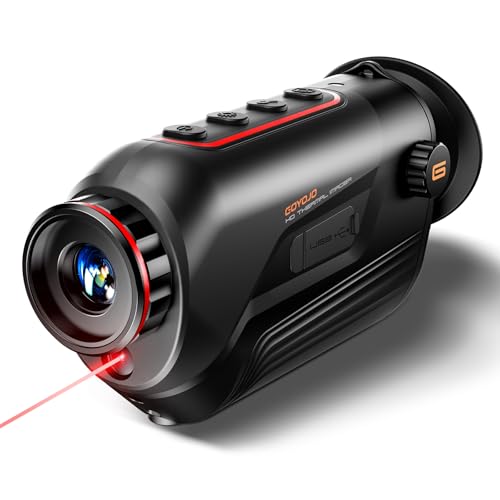
【Thermal Imaging Technology】 GOYOJO thermal imaging monocular features a state-of-the-art 256x192 thermal imaging camera sensor paired with a 12μm infrared detector. This advanced technology ensures high-resolution thermal imaging, providing users with a clear and detailed view of their surroundings in low-light conditions.
High Resolution Thermal Imaging: Equipped with a 384x288 thermal sensor and 15mm objective lens, featuring 2x base magnification and a 17.5° horizontal field of view. Maximum detection range is up to 853 yards under controlled testing conditions. Actual performance may vary depending on environmental factors such as temperature contrast, humidity, target size, and terrain conditions
Why Pulsar Thermal Leads the Civilian Market
Pulsar’s in-house production process ensures consistent quality across all their thermal devices, making it the top choice for the civilian market. Every component—lens, sensor, and housing—is crafted and assembled within their European facilities. This vertical integration means fewer quality variances and greater reliability, so you can trust your thermal imaging for hunting or security tasks. This approach also helps manage thermal camera costs by reducing reliance on external suppliers. Pulsar’s control over the entire manufacturing process also speeds up innovation, allowing them to incorporate cutting-edge video and Wi‑Fi technology directly into their products. They regularly push the limits of thermal sensitivity and connectivity, giving you devices that are not only precise but also highly versatile. Military users often choose Pulsar devices for their reliability in harsh conditions due to the same rigorous build standards. From compact monoculars to multi-purpose night-vision models, Pulsar offers solutions that fit a range of budgets and needs, solidifying their reputation as a leader in the civilian thermal market. For example, the Pulsar Quantum HD50s provides a detection range of about 1200 meters, significantly enhancing long-range identification compared to smaller models. Reviews of top night vision goggles consistently highlight Pulsar’s superior performance across both thermal and traditional night vision categories.
How to Get the Most Out of Your Pulsar Thermal Device
To get the most out of your Pulsar thermal device, focus on mastering key settings and habits that influence image clarity and recording quality. Start with focus: set it at the base magnification and verify sharpness by slightly adjusting until the image appears crisp. Pre-focus on areas where you expect to find your target to prevent missing important details once you start recording. For image settings, begin with brightness at a mid-range level, then fine-tune contrast to improve the differentiation of objects against the background. Higher-quality devices like Pulsar offer a broader adjustment range for these settings, allowing for more precise calibration. Use Normal mode for the clearest images, and make sure to disable the moving filter during recording to prevent blurring. Thermal calibration should be performed just before recording to minimize artifacts and ensure the most accurate temperature readings. Manage your battery life by turning off Wi-Fi and reducing screen brightness when these features aren’t needed. In cold weather, carry spare batteries to prevent interruptions. Stability is crucial, so use a tripod to steady the device, especially during prolonged observations. Keep your lens clean to maintain image quality, and always power off the device before connecting it to transfer files. Proper practice with these settings and habits will maximize your thermal imaging experience.
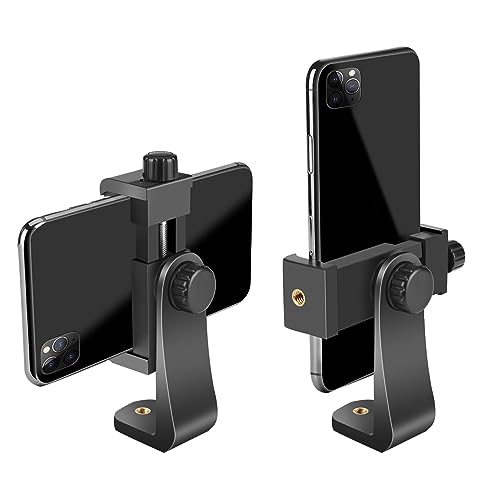
FEATURE: the tripod phone mount is adjustable by screw mechanism, 360 degree rotating, vertical(portrait mode) and horizontal(landscape mode) or any angle as you need, not necessary to take your cell phone out of a standard tripod or small tripod.
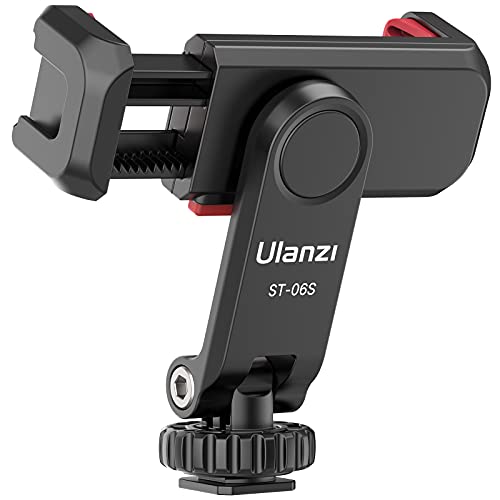
Any Angle, Instead of a Ball Head: The traditional smartphone tripod mount cannot adjust the Z-axis angle, but our phone tripod adapter ST-06s adjustable angle design allows you to adjust the pitch angle on a tripod or camera hot shoe without a ball head. It is more convenient and easy to use

HANDHELD THERMAL IMAGING TRIPOD MOUNT:Engineered to bridge thermal cameras onto standard camera stands securely.