DIY Thermal Monoculars: Build Your Own Guide
Wondering how to build your own thermal monocular without breaking the bank? The key is choosing the right components: a budget-friendly 256×192 thermal sensor or a higher-resolution 384×288 core for better long-range detection.
Pair it with a bright OLED display and a decent lens to get clear images and a wide field of view.
Keep reading to see how all the pieces come together.
What Thermal Core Works Best for Your DIY Thermal Monocular?
A 256 × 192 thermal sensor is suitable for close-range scanning and provides enough image resolution without overloading your budget. This size balances cost and performance, making it ideal when detection distances are shorter and detail is less critical. If you plan to use your monocular for detecting warm objects nearby or in confined spaces, this sensor size will typically suffice and keep your DIY project affordable. For those who also want to record what they see, some iPhone night vision accessories feature similar sensor resolutions for compatibility with mobile devices. Unlike thermal imaging, night vision relies on ambient light rather than heat signatures. For budget-conscious builders, choosing a lower resolution sensor can significantly reduce the overall cost of your thermal monocular.
For longer distances or cluttered environments, a 384 × 288 core performs better by offering sharper scene clarity and better target separation. It can differentiate objects in complex terrain and reveal finer details at greater ranges. Pair this with a low NETD (≤18 mK) to enhance the ability to spot subtle temperature differences, especially on low-contrast backgrounds. The size of the sensor influences power consumption and cost, so choose an appropriate resolution based on your specific range needs and budget constraints.

[Advanced Thermal Precision] Features a highly sensitive infrared sensor with multiple resolution options (up to 640x512), providing clear thermal signatures for industrial inspection and nighttime navigation.

3-in-1 Multi-Function Thermal Scope: The Hydra combines standalone thermal riflescope, handheld monocular, and clip-on thermal module into a single versatile device. It offers exceptional adaptability for various hunting and shooting scenarios, making it one of the most innovative thermal optics available.

Smooth 25Hz Thermal Imaging — Equipped with a 256×192 infrared detector and 25Hz refresh rate for real-time, lag-free thermal video. The wide 56°×42° field of view, letting you scan entire electrical panels, HVAC systems, or engine compartments in a single frame.
Choosing the Right Display for Your DIY Thermal Monocular
Choosing an OLED thermal display is the best option for your DIY thermal monocular because it offers high contrast and low power consumption. This combination helps preserve battery life while providing clear thermal images. Make sure the display’s pixel count matches your thermal sensor’s output— this ensures accurate representation without any blocky or pixelated visuals. A high-density microdisplay allows you to differentiate temperature differences more precisely, which is crucial for effective thermal imaging. The display unit used in builds like the PVS840 includes 0.79-inch screens and 60mm lenses, ensuring a compact yet effective fit against the eye. For extra savings, consider that choosing lower-tier plans can reduce long-term costs without sacrificing crucial features. Understanding how generation levels affect the sensor cost can help you choose a more affordable thermal core for your build. These cameras typically rely on passive infrared radiation to detect heat signatures, which your sensor must capture accurately.
Refresh rate matters too; a 60 Hz display keeps moving targets sharp and reduces lag, making your viewing experience smoother. Size is another factor—select a compact panel that fits comfortably against your eye to keep the device lightweight and manageable. Avoid slow or low-resolution screens as they waste the sensor’s potential and can hinder you from spotting subtle temperature variations.
How to Pick a Lens for Your DIY Thermal Monocular?
How to Pick a Lens for Your DIY Thermal Monocular?
The best lens for your DIY thermal monocular depends on your specific needs, but a focal length of around 35mm often offers a good balance. Shorter focal lengths like 25mm provide a wide field of view, making them ideal for scanning dense forests or close-range exploration. Longer focal lengths such as 50mm narrow your view but increase detection range, which is useful for identifying targets at a distance in open terrain. For a DIY build, keep in mind that units with a lens size of 50mm will offer higher base magnification than a 35mm lens, as indicated by focal length specifications. However, while a longer lens increases range, it also adds weight and cost, similar to how ballistic helmet models offer more protection but weigh more than bump versions. For beginners, understanding thermal imaging specifications can help guide your final selection. Additionally, assembling your own thermal device allows you to customize lens options based on the specific parts and budget you source from a thermal drone build guide.
Choose a lens made from germanium or zinc selenide, as ordinary glass cannot transmit thermal wavelengths effectively. Larger lenses gather more infrared energy, resulting in brighter images and longer detection distances. Match your lens choice to your environment and mission: wide lenses are better for cluttered areas while longer lenses excel in open spaces. Ultimately, your terrain and target distance should guide your selection, not just the largest or most expensive option available.

Advanced DLC film technology enhances wear resistance and extends the service life of the germanium window.
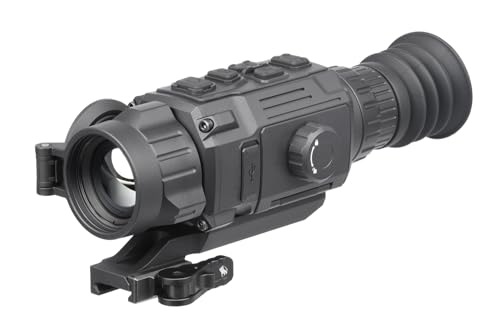
Enhanced thermal imaging: Features a 35mm Germanium lens and a 384x288 resolution thermal sensor for crisp, detailed images even in low-light conditions.

Enhanced Detection: Features a 50mm germanium lens and 640 × 512 thermal sensor for an improved detection range of up to 2,600 meters/yards.
Picking a Reliable Battery and Power Supply for Your Build
Choosing a reliable battery for your DIY thermal monocular involves more than just selecting the highest capacity. You need to match the chemistry, voltage, and form factor to ensure compatibility and safety. Lithium-ion cells, such as 18650 or 21700, are excellent choices because they provide high capacity and stable output, supporting long runtimes. CR123A lithium batteries perform well in cold weather, maintaining power when temperatures drop. 1.5V lithium AAs tend to have a flatter discharge curve than NiMH batteries, which helps prevent sudden shutdowns during use. Always check the nominal voltage—your device typically requires 3.6V or a regulated supply. For trail cameras, similar battery choices are reviewed to help buyers find the right fit for their specific needs. Additionally, understanding how night vision goggles amplify low levels of light can help you appreciate why thermal monoculars, which instead detect heat signatures, demand a different power management approach.
Battery capacities around 4,000 to 6,000mAh generally offer 9 to 11 hours of runtime, but factors like Wi-Fi use or high brightness levels can reduce this. To protect your batteries and extend their lifespan, avoid deep discharges, charge above freezing temperatures, and remove batteries when storing the device long-term. Carry spare batteries for extended sessions or emergency backup. It is crucial to select verified cells from reputable manufacturers to prevent weak output, potential failure, or safety hazards during operation. Note that unlike night vision goggles, thermal monoculars detect infrared radiation rather than amplifying visible light.

✔ Built with integrated safeguards including over-charge, over-voltage, short-circuit, and over-current protection. Our 3.7V 18650 21700 26650 battery charger automatically stops charging when the battery is full, preventing damage to your batteries and ensuring complete peace of mind during use.

Scope of application: Lithium batteries with nominal voltage of 3.6V and 3.7V (including 18650, 26650, polymer lithium batteries)
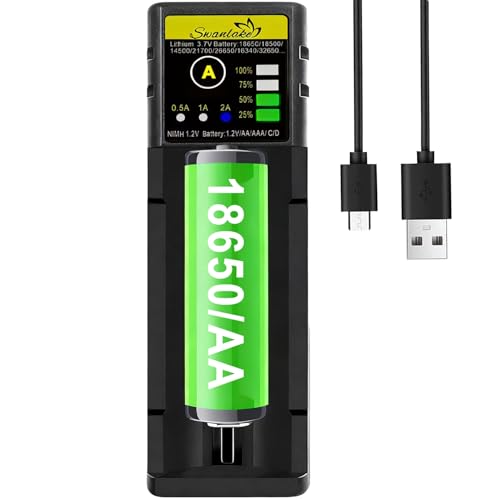
UNIVERSAL COMPATIBILITY:intelligence charger is compatible with 1.2V-1.5V Ni-MH Ni-Cd A-AA-AAA-AAAA C batteries,Also charger for 3.7V-4.2V Li-lon 18650 18500 18350 17650 17670 17500 20700 21700 26650 rechargeable battery(battery not included)
Printing or Improvising a Housing That Fits Everything
To ensure everything fits securely inside your housing, start by measuring each component accurately before designing or cutting. This helps you create a snug internal layout that avoids rattling or obstruction of the sensor. Sketch your interior, marking the positions for the sensor window, buttons, and ports, so you can plan cutouts and mounting points precisely.
Choose materials based on your needs: PVC pipe offers a low-cost, easy-to-cut option suitable for straightforward enclosures, while 3D-printing with PETG provides a tough, accurately fitting shell that can be customized to tight specifications. When designing, keep ventilation in mind to prevent heat buildup from electronics, which can affect performance. Reusing parts from a previous thermal microscope project, including lenses and the case, helps maintain low cost and simplifies assembly. For power, you can also repurpose a 12 volt battery for trail cameras to reliably run your thermal monocular. Understanding how a thermal imager works helps you prioritize proper sensor alignment and heat management during assembly.
Plan your wiring pathways early to prevent clutter and interference. Use screws and standoffs to secure modules firmly, and threaded backs or access panels to allow easy battery replacement and maintenance. Make cutouts for sensors and controls as clean and precise as possible to ensure unobstructed views and responsive operation. For enhanced low-light performance, consider integrating a color night vision camera module that can be paired with your thermal sensor.
If speed is a priority, pre-made plastic enclosures can be improvised as a quick solution, but always double-check that the sensor’s view is unobstructed and that airflow is sufficient for cooling. Proper planning and measurement are key to creating a durable, functional housing that fits all parts perfectly.
How to Assemble the Optics and Electronics in 6 Steps
To assemble the optics and electronics, follow these six precise steps. First, align the optical path so the sensor receives a centered thermal image. Use the correct objective lens and hand-tighten it while ensuring the focus ring remains accessible for future adjustments. For proper thermal detection, ensure the sensor is compatible with a longwave infrared filter to block unwanted wavelengths, and be sure to check the lens mounting mechanism for a snug fit to prevent light leaks. It is also critical to choose an objective lens with a focal length matched to your desired field of view.
Next, seat the sensor PCB and the microcontroller securely in the carrier. Position them with precision using header pins and spacers to keep the boards rigidly in place. Solder the initial pin to verify alignment before soldering the remaining pins.
Third, insert the batteries with the correct polarity marks aligned and lock the battery compartment securely. If external power is required, connect it via the Type-C port, making sure connections are solid to prevent power issues.
Fourth, connect the display and enable the correct output setting. Perform color calibration to ensure accurate color representation and check contrast levels to improve target distinction.
Fifth, adjust image stabilization settings if the feature is available. Begin with lower magnification to make manual adjustments easier and to stabilize the image during initial testing.
Finally, perform a bench-test of the entire assembly. Confirm that all components operate correctly, the image aligns properly, and there are no loose connections before moving on to the next phase of development.
How to Fix Fitment Issues With Camera Mounts and Battery Compartments
To fix fitment issues with camera mounts and battery compartments, start by checking your mount geometry. Camera bodies with nonstandard outer dimensions often leave gaps or twist at the interface. Confirm the mount’s compatibility with your thermal scope’s objective diameter, sticking to adapters between 40 to 56 millimeters to avoid creating pivot points. Over-tightening does not solve poor fitment; it can warp adapters and strip screws. Instead, add spacers to level the optical axis and then use thread lock after snugging everything down. When selecting a thermal scope, compare top-rated models like DJI drone options to ensure the mount matches your specific camera design. Unlike standard camera optics, thermal cameras detect heat rather than light, so a loose mount that shifts the sensor’s aim can cause false temperature readings.
Next, inspect your power compartment. Rear-mounted batteries can block clamp rails or shift the balance, so test-fit the powered units before applying final torque. Make sure the battery door remains accessible for swaps without needing full disassembly. If contacts lose power during movement, reposition the battery pack or reroute the cable to prevent tension. Reinforce the setup with a rail clamp or hose clamp as a backup—relying on a single screw can risk failure. Always recheck alignment after any adjustments or adjustments.
How Much Will Your DIY Thermal Monocular Cost?
Your DIY thermal monocular’s cost will largely depend on the resolution of the thermal sensor you select. A basic 256-class sensor typically costs between $130 and $200, which can push your total build cost to around $250 to $600. If you choose a higher-resolution 640-class sensor, expect to pay $500 to $800 or more, bringing the overall cost closer to $400 to $425 for a more polished assembly. In addition to the sensor, you’ll need a display that costs approximately $30 to $45, and optics like a $30 lens for longer focal lengths. Sensor calibration tools, which ensure accurate readings, and thermal image processing hardware, which adds complexity, are also necessary. While cheaper builds under $200 are possible, they usually result in lower image quality. Ultimately, your budget hinges on your resolution choice, not on the accessory costs.
Common Assembly Mistakes and How to Avoid Them
To avoid common assembly mistakes, follow these key guidelines. First, never skip sensor calibration. Pointing your unit at the sun or a welding arc can damage the thermal sensor, so always perform a cap-on recalibration in controlled conditions. For optical alignment, be cautious with the diopter adjustment; misaligning it causes blur and eye strain. Turn the diopter until the display appears razor-sharp, and keep your glasses on if you normally wear them. During head-mount assembly, do not force parts into incorrect slots—follow the sequence exactly to prevent damage or misfit. Finally, handle lens cleaning carefully: never wipe the lens with dry debris. Use compressed air and a lens cap, and avoid harsh cleaners that can strip coatings. Remember, treat the device primarily as a heat-sensing instrument, not as visible optics, to avoid these common mistakes. Relying heavily on digital zoom diminishes image quality, so instead prioritize optical magnification and a wide field of view for clearer detection.