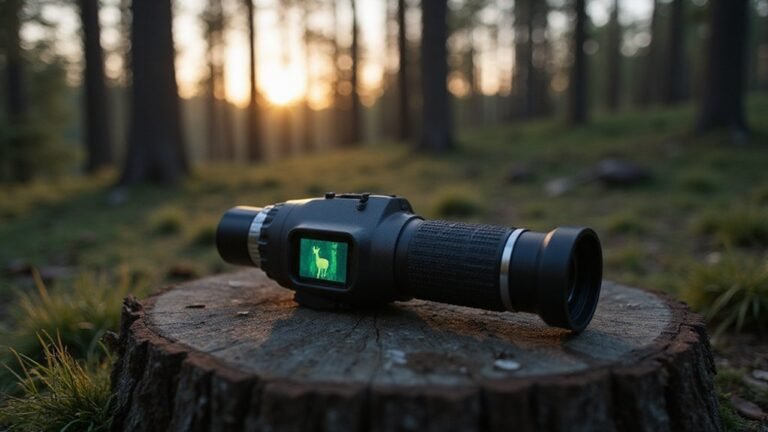
How to Build DIY Thermal Goggles for Night Vision
Struggling to see in the dark without spending thousands on commercial night vision? Building thermal goggles at home can be a budget-friendly way to get that enhanced visibility.
While it’s more complex than just adding a camera, understanding the key components and careful assembly make all the difference.
The full guide below walks you through turning basic parts into a functional thermal viewing device.
Why Your DIY “Thermal” Goggles Are Actually Night Vision
Your DIY “thermal” goggles are almost certainly night vision devices. They confuse thermal imaging with night vision, but these are fundamentally different technologies. Thermal goggles detect emitted infrared heat, which allows them to see in complete darkness regardless of ambient light or external illumination. Night vision, on the other hand, amplifies available light—such as moonlight, starlight, or IR illuminators—to produce a brighter image. True thermal technology detects heat signatures rather than amplifying light, which is why it performs so well in total darkness and through obscurants like smoke. For buyers, understanding the difference between night vision cameras and thermal imaging is essential for choosing the right device. For example, a thermal camera can even detect the heat signature of a fart in complete darkness, highlighting its extreme sensitivity to temperature differences.
Most DIY setups use a standard camera sensor and display intended for visible light, which makes them light amplifiers rather than true thermal devices. True thermal sensors measure temperature differences down to fractions of a degree Celsius and don’t need any light at all. They can see through darkness, smoke, and fog by detecting heat emissions, not reflected light. In contrast, your gadget is just a low-light camera with a fancy case; it cannot sense infrared heat emissions, only visible or near-infrared light. Calling it thermal is misleading. It’s night vision—a different and more limited technology—but perfectly useful if you understand its capabilities and limitations. For instance, true thermal equipment excels at obstacle penetration by detecting heat signatures through brush and foliage, whereas your DIY device will struggle with such obstructions because it relies on amplifying available light.
The 5 Essential Components for a Night-Vision Goggle Build
The five essential components for a night-vision goggle build are the image intensifier tube, objective lens system, eyepiece lens system, optical alignment, and housing with power supply. The image intensifier tube is the core of the device, amplifying ambient light into a visible image. Its quality determines the clarity and sensitivity of your night vision. The objective lens system gathers this light; better lenses provide sharper images and a wider field of view. For a thermal-based build, you could alternatively use a thermal sensor module as the core component instead of an image intensifier tube.
The eyepiece lens system magnifies the intensified image, allowing your eye to see details clearly. Precise optical alignment between the intensifier tube, objective lens, and eyepiece is crucial—misalignment results in blurry or jarring images. The housing must be durable enough to protect fragile internals from impacts and moisture, with materials like reinforced plastics or metals. Assembly processes also require specialized tools like air guns for cleaning and precision equipment to ensure component compatibility. Lastly, a stable power supply keeps the system running, while infrared illumination enhances visibility in total darkness. Getting these five components right ensures a functional and effective night-vision goggle.

【DIY Night Vision Scope System】 Transform daytime optics into a powerful nocturnal tool. This DIY night vision scope upgrade kit is designed for spotting scopes and monoculars. Ideal for nighttime farm perimeter patrols, nocturnal wildlife observation, or exploring outdoors after dark. Adult use only.

Day/Night Vision: IR-CUT Filter switched in and out automatically based on light condition (only visible light during the daylight and infrared sensitivity during the night with 850 IR LEDs on)
Assemble the Frame, Camera, and Display in Order
Start by fixing the camera to the lower front of the frame, ensuring its lens is parallel to your sightline. Secure it using brackets or adhesive, and double-check that it stays aligned during movement. Next, attach the display housing so that the mini screen is directly in front of your eyes and centered for a natural, comfortable view. Connect the camera to the display before sealing any components, allowing you to verify the image output early and avoid rework. Once confirmed, lock both the camera and the display into place using clips or glue, making sure internal spacing prevents anything from touching your face or blocking strap adjustments. Perform lens calibration while the device is powered, tweaking the focus for clear thermal imaging. Finally, test the setup in a dark room to confirm the display remains clear and the frame stays comfortable for extended wear. Ensure the FLIR camera receives a stable 5V from the power splitter to avoid damaging the electronics during operation. For low-light environments, consider adjusting the camera’s infrared sensitivity to match the available ambient light and improve image contrast. Use a multimeter to verify voltage levels at the splitter before connecting the display, preventing power fluctuations that could cause screen flickering. To protect the components from weather and impact, seal the housing with a waterproof gasket and consider adding a desiccant pack to prevent internal condensation.

Universal Camera Bracket, Heavy dutyweatherproof aluminum bracket fits mostbrands of outdoor camera housing, Aluminum stand not plastic

Universal Mount Bracket for Most Indoor Outdoor Camera Housing

WiTi BK06 is a junction box bracket designed for security CCTV cameras.
Wire the Power System Without Damaging Components
Before soldering, always verify polarity. Connect positive to positive and negative to negative throughout the chain to prevent damage. Use a multimeter to measure the converter output voltage before attaching sensitive components; this ensures the power supply is functioning correctly. Secure all joints with solder and heat shrink tubing, working with 28–30 AWG wire to maintain flexibility and minimize risk of shorts. Neatly tuck cables away to prevent pulling on pads or connections, which could cause damage or intermittent faults. Proper organization and careful checking help protect your build from accidental shorts, voltage spikes, and component failure. This mimics the passive infrared trigger used in standard trail cameras to conserve battery life. To safely power the FLIR, use a UBC splitter for 5V regulation from the main battery. Without a cellular signal, the system will operate in offline mode with no remote image transmission. When selecting a lens for the camera module, ensure it is compatible with the thermal sensor array to focus infrared wavelengths correctly.

5.5x2.1mm DC Plug Active PoE Splitter,48V to 5V 2.4A (Max. 12watt)

What You Get: 2 x DC 1 Female to 2 Male Power Splitter Adapter Cable

【PoE 48V to USB C 5V/3A】Convert 48V PoE to USB C 5V/3A output. USB C cable for power supply and RJ45 cable for netework transmission. Non-PoE devices with USB C ports can enjoy the same convenience of POE power as POE devices.
Test Your Night-Vision Feed and Tune IR Illumination
Power up the unit before mounting any components to verify the live camera feed. This step helps you identify signal or wiring issues early. Ensure you receive a solid video signal from the camera to the display before proceeding with final assembly. In a completely dark room, check your infrared calibration by observing the IR LEDs as bright white spots on the camera image. If the image disappears, your IR illumination is either too weak or misaligned. Verify that IR night vision shows dark environments clearly, revealing dust and pollen, as noted during testing.
Next, adjust the IR illumination strength to match your camera’s sensitivity. Fine-tune the current-limiting resistors until the scene appears bright enough without washing out the image. Verify focus and alignment by setting the objective lenses for infinity and the eyepieces to zero diopters. Confirm that the camera lens fills the monitor’s field of view evenly, making adjustments as needed. After each tweak, repeat the tests to ensure your setup remains stable, ideally using fresh batteries for consistent power. Finally, double-check the wiring to prevent pinched conductors when reassembling the unit.
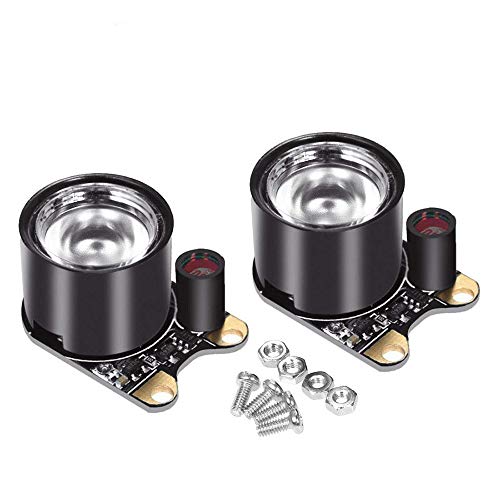
3W high-power 850 infrared LED,designed to work for Raspberry Pi camera

The infrared transmitter module is directly transmitted by a single tube, and the waveform needs to be modulated by the program.

10 Pairs 5MM Infrared Emission+Receiver Tube